

Who this is for and what it solves
The P0 Runtime Access for AI lets developer and security teams control access for agentic applications that connect to internal data sources, such as a Postgres, Snowflake, Mongo database through a chat interface.
Imagine you are building an agentic AI app such as a customer service agent for a web shop. The agent needs access to orders and fulfillment data stored in Postgres and you have connected Postgres via MCP tools to the agent. Your human customer service representatives can chat with the bot and access relevant information from Postgres. For security, you ultimately need to ensure that the representative has access to the right data in Postgres. To achieve this, you also need to give it access to the right MCP tools.
Let’s illustrate how P0 can help:
- P0 provides API endpoints that you can call from your MCP server to gate-keep access to MCP tools and can restrict access to the different tools based on the end-user’s role.
- As a second control layer you can define a data access policy directly at the table, column, or row-level in the underlying data source, in our example, a Postgres database.
- The control plane also implements Just-in-Time Access. When resources are “requestable,” the system can route approval requests to human approvers for short-lived, scoped access.
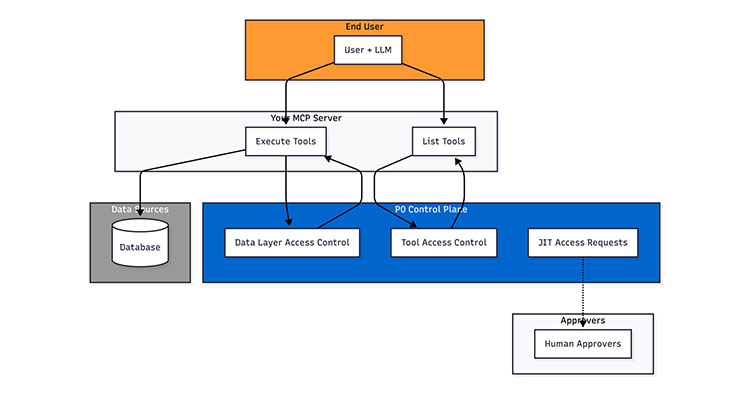
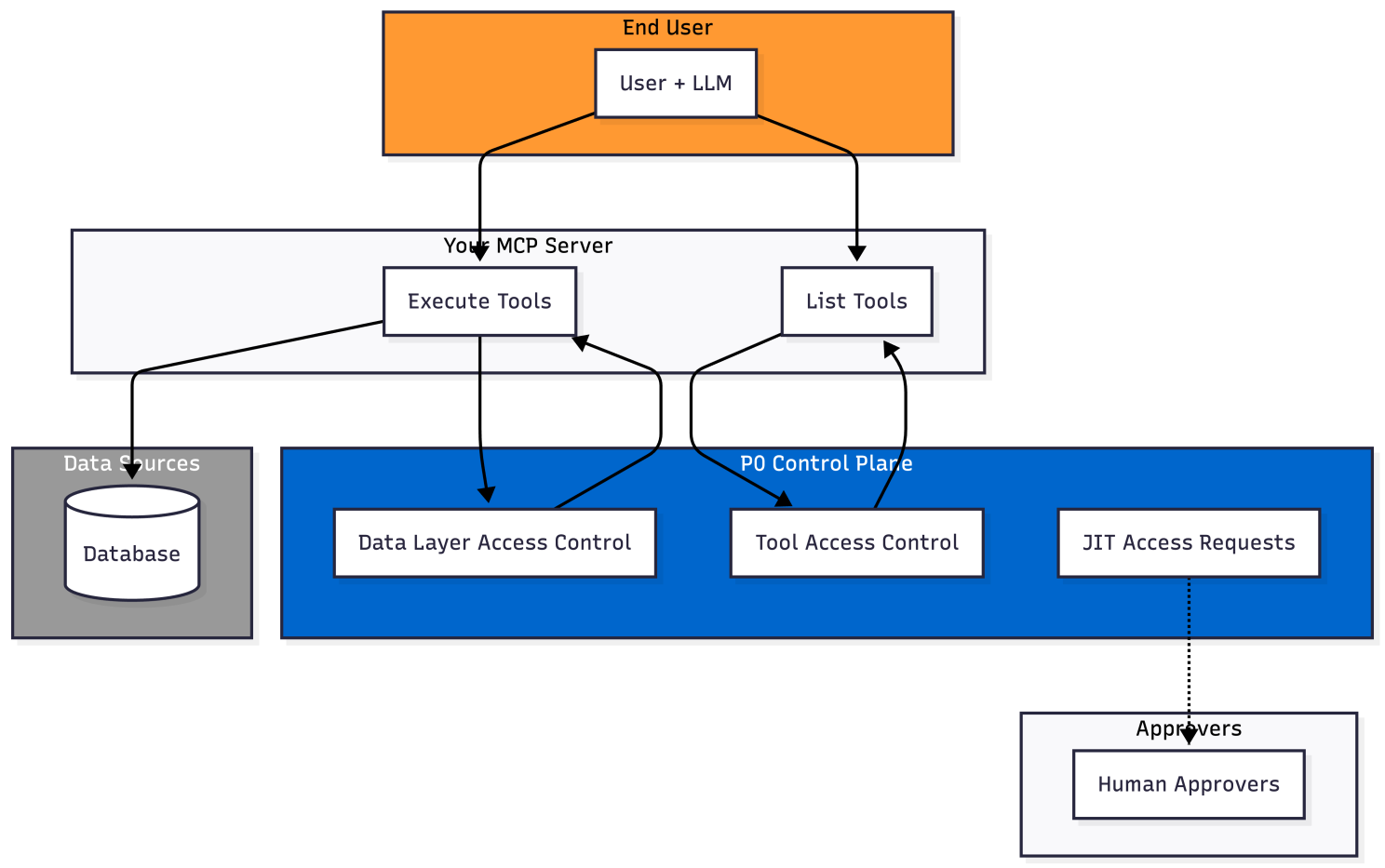
Here is a high-level diagram that represents the key components and flows of the Control Plane, showing the two main control layers:
- MCP Tool Access Control: P0 filters which MCP tools users can see based on their role
- Data Layer Access Control: P0 evaluates SQL queries to ensure users only access authorized data
Let’s dive into the details!
Data access control without AI
Connecting to internal data is not new. Applications rely on data sources and take actions beyond reading data.
Traditionally in a web application, customer interaction from the frontend goes to the backend, which acts as a translation layer between the end user and the underlying data source. The frontend authenticates the user and allows execution of specific API endpoints, each encoding one or more database actions (e.g., updating an order status).
The backend authenticates to the database with a service identity, typically a database user with broad permissions covering all possible API actions the endpoints require. Access control is enforced via a sort of lightweight RBAC based on user roles. This can be viewed at the “narrowing” function of access control where broad permissions are narrowed in the backend by coding in specific column lists and a WHERE clause (e.g., WHERE user_id = current user).
Enter AI agents
In agentic apps the AI can also take actions, often “write” actions, on the data source. But in this case the API endpoints are replaced by MCP tools that describe the action and the inputs of the action in natural language. In the most basic 1:1 translation case an order-update API endpoint might look like this:
While the MCP equivalent “Update order” tool might look like this:
Under the hood, this tool may call an existing API endpoint and pass on the inputs as parameters. In a web app, the frontend (client) knows which API endpoint to call when and avoids endpoints with invalid parameters based on the user and their role in the system. Access control is pushed into the client.
In an agentic app, the LLM has more freedom. Regardless of whether the frontend is Claude Desktop or a custom chat UI, the LLM decides which tools to call and with what inputs, making forbidden tool invocations harder to avoid.
Where the web app relied on the frontend for valid calls, MCP tool and input descriptions must now do the same in free-text form. One way to include the role information in MCP tools is to expose multiple versions of the same tool, using different names and descriptions, e.g. update_order_customer and update_order_store_admin:
The key difference is in the top-level description field and orderId: the customer version explicitly limits updates to orders owned by the current user, while the store admin version can update any order in the system.
Then the agent will hopefully call the right one, and if it doesn’t, roles are typically enforced in the MCP tool implementation, usually via the original API endpoint. The agent may infer the correct tool from errors, or be guided through other mechanisms that expose user role context.
Now, with P0
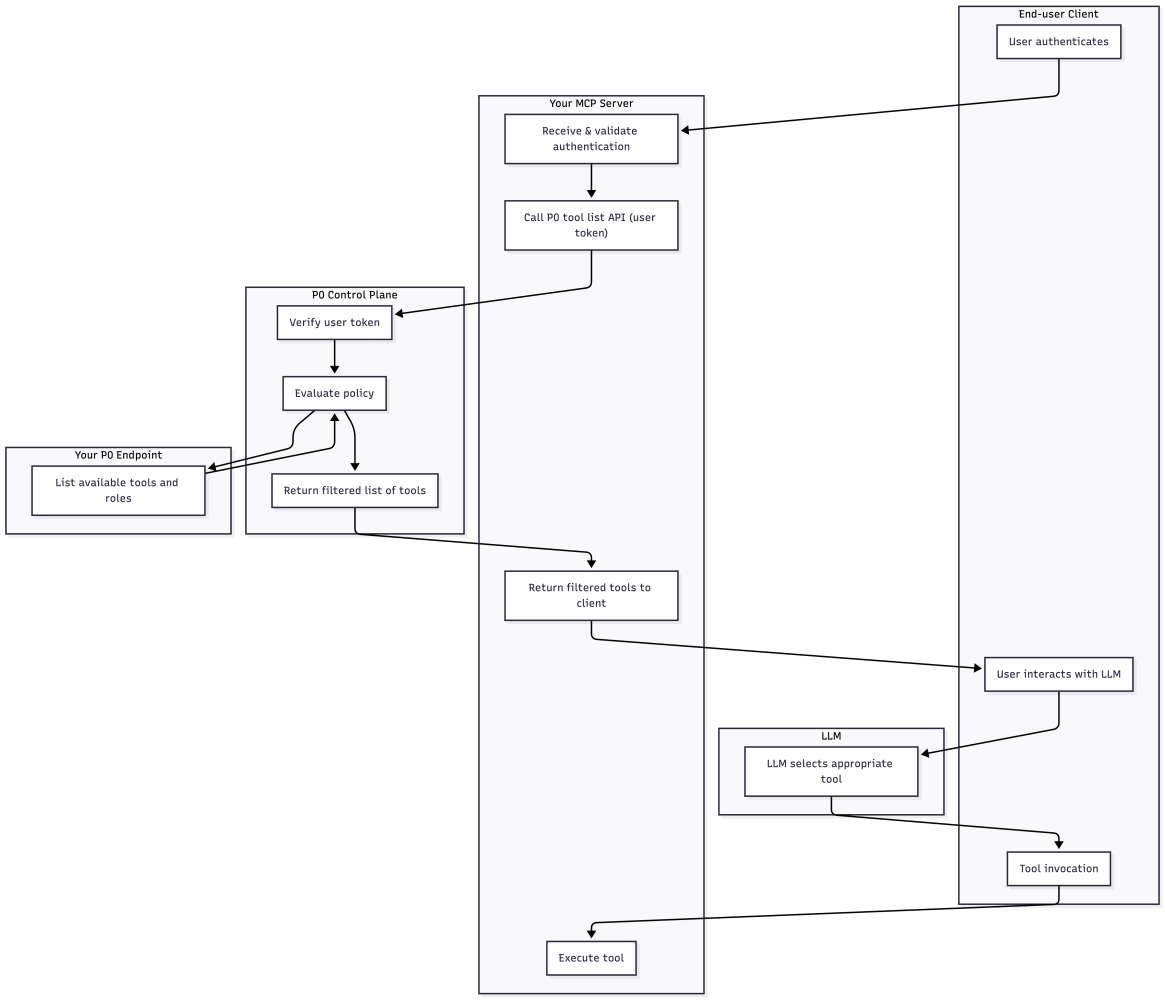
With P0, only role-appropriate tools are returned. The MCP server calls the P0 API from your list_tools implementation, and P0 returns only the subset of MCP tools the user is allowed to use. The disallowed update_order variants are never exposed to the LLM, eliminating the risk of accidental or malicious tool selection.
You provide an HTTP endpoint to P0 that returns the complete list of MCP tools you want to use in your app, together with the complete list of roles. Example response of your exposed HTTP endpoint:
You can then define the mapping of which MCP tools are accessible by which roles in the P0 Policy Studio within our console. For example:
P0 then provides the correct MCP tools to use in your agentic application to enforce this policy and only expose the tools that the user is allowed to see. The “policy” format follows the Policy Studio syntax of P0. Its purpose is to map roles to tools with the specified “filters”. (Note the “requestor” and “approver” definitions. Everything in P0 is an access request, even if it doesn’t require human approval. More on that later.)
After an authenticated user session is established in your MCP server, the user’s authN material – typically an access token -, is passed transparently to the P0 API endpoint for listing tools. The P0 backend verifies the token and lists the tools available to this user, based on the policy configuration.
Example ls command payload for listing tools or roles (follows the command API of P0):
Here is the complete flow for controlling access to MCP tools using the P0 Runtime Access for AI:
Data layer access control
Defining a policy for MCP tools works well for controlling “front-door” access. For defense-in-depth, it’s good practice to deploy safeguarding rules that control access from the perspective of the data source. These rules make sure that users can only ever access certain data in the database, regardless of MCP tool. More, some MCP tools may be given considerable liberty to operate within the database. At the most permissive end of the spectrum, you can imagine an MCP tool that allows executing any query in the database. Example:
Since the service account that connects to Postgres from the MCP server has broad permissions, the end-user may be able to access data that they would not normally have access to through the AI application, or even issue an INSERT, UPDATE, or DROP.
Now, with P0
P0 narrows user access to only the data they are allowed to see. Data access rules are defined in P0 policies using a language that closely models the RBAC of target database. For example, for Postgres you can specify allowed actions on tables, columns, and rows, similar to GRANT statements or row-level POLICY objects.
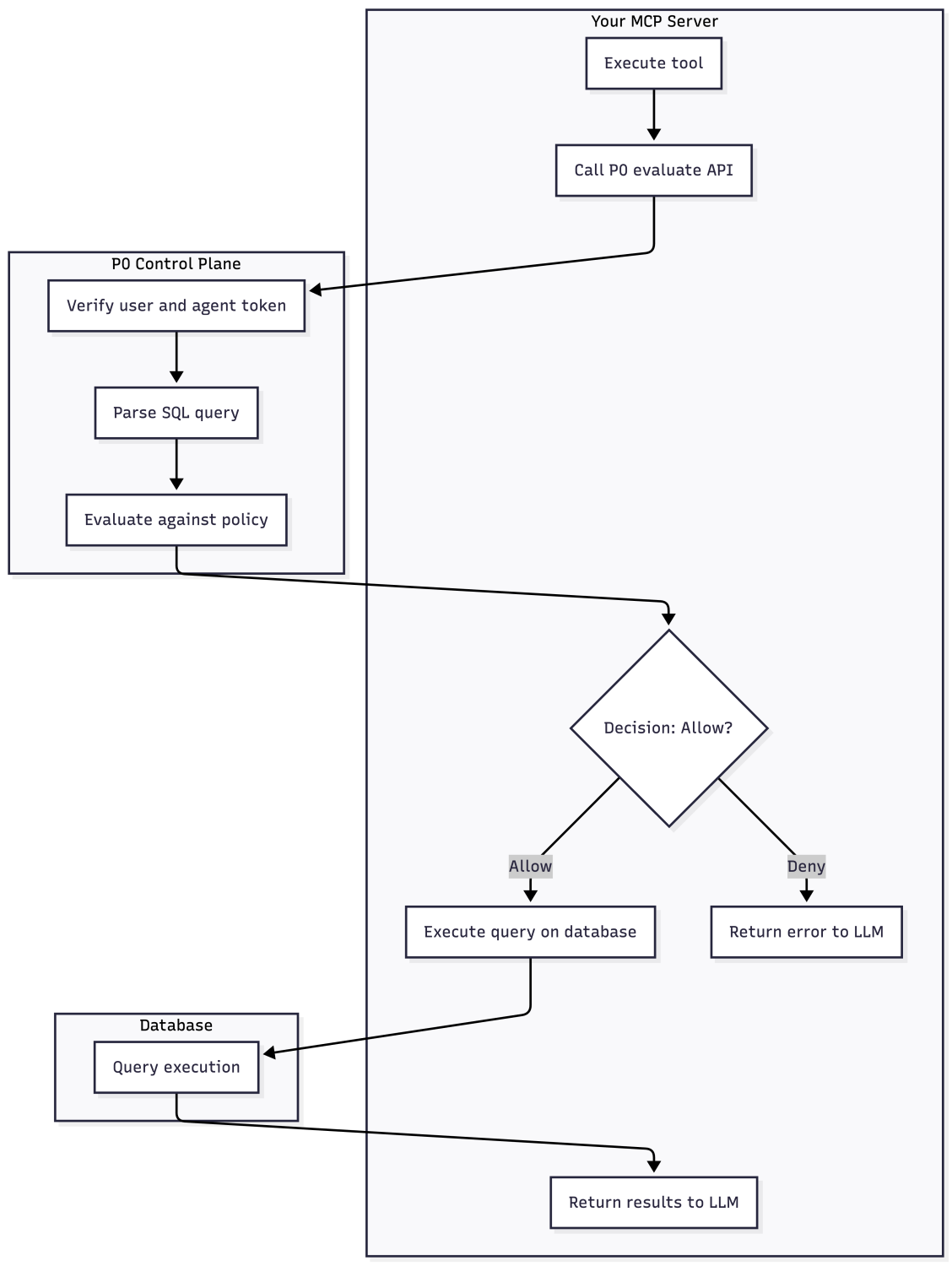
Define the policy in P0’s Policy Studio that applies to user access through a specific agent. All agentic access is subject to this policy, independent of the MCP tool. When executing queries from the MCP tool implementation, invoke the P0 API endpoint to evaluate whether the agent-generated SQL query can run on behalf of the end user. Example request:
P0 parses the query to understand the operations involved and then checks against the policy. Note, that P0 only decides if access should be allowed and does not proxy queries to the database. That communication is entirely between the agent and the database, and should be gated based on the result of the decision.
Just-in-Time and Human-in-the-Loop with P0
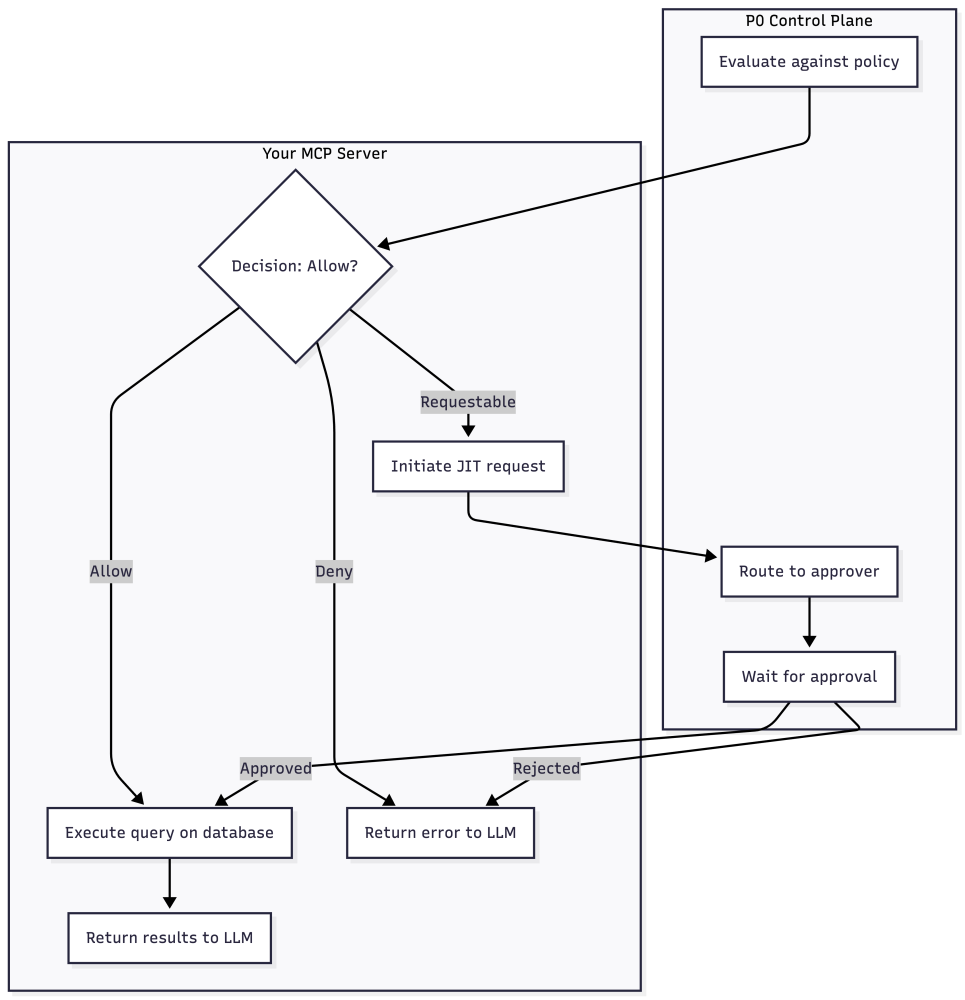
The P0 API endpoints /command … ls and /evaluate return more than a simple exists / not exists and yes / no response, respectively. They have a third state, which is “requestable”.
A requestable MCP role or tool can be autonomously requested by the LLM on behalf of the user, if the user wishes so. The LLM can figure out if a role/tool would be useful in answering the prompt and can automatically ask the user if they want to start the Just-in-Time workflow to gain access to the tool/role in the current session. After another human approves their use, these tools can be used by the LLM.
Similarly, resources protected by the /evaluate endpoint can also be requested in a JIT manner.
P0 exposes an MCP server of its own that lets the LLM create an access request on behalf of the user. It is good practice to indicate in the tool description how to escalate access with the P0 MCP server for the tools / roles that require human approval.
It may make sense to configure different approvers for (A) the access to MCP tools, and (B) the underlying data. P0 handles the routing of the requests to the appropriate people, and once access is approved, the LLM can start using it to answer the user’s prompt.
Frequently asked questions
What is P0 Runtime Access for AI?
A P0 Runtime Access for AI is a centralized system that enforces access decisions for every agent action at the moment it happens, rather than relying on standing permissions.
How does an P0 Runtime Access for AI enforce fine-grained access for autonomous agents?
A P0 Runtime Access for AI enforces fine-grained access for autonomous agents by evaluating each action against policy in real time instead of pre-granting broad scopes.
How does secondary authorization scope agent permissions to the human end-user?
Secondary authorization scopes agent permissions to the human end user by checking every agent action against that user’s actual access rights before allowing it.
How does P0 Security architect a centralized P0 Runtime Access for AI for agentic access?
P0 Security architects a centralized P0 Runtime Access for AI for agentic access that governs every agent action across the full action chain from one system.